<?xml version='1.0' encoding='UTF-8'?>
<plugins>
  <plugin id="com.explyt.spring" url="https://github.com/explyt/spring-plugin/releases/download/261.33.80/spring-tool-261-b95.zip" version="261.33.95">
    <idea-version since-build="261" until-build="265.*"/>
    <name>Spring Explyt</name>
    <vendor email="support@explyt.ai" url="https://explyt.ai/docs/category/explyt-spring/">Explyt</vendor>
    <category name="JVM Frameworks"/>
    <description><![CDATA[<h1>Explyt Spring Plugin — Free Spring Boot plugin for IntelliJ IDEA Community (Java, Kotlin, Quarkus)</h1>

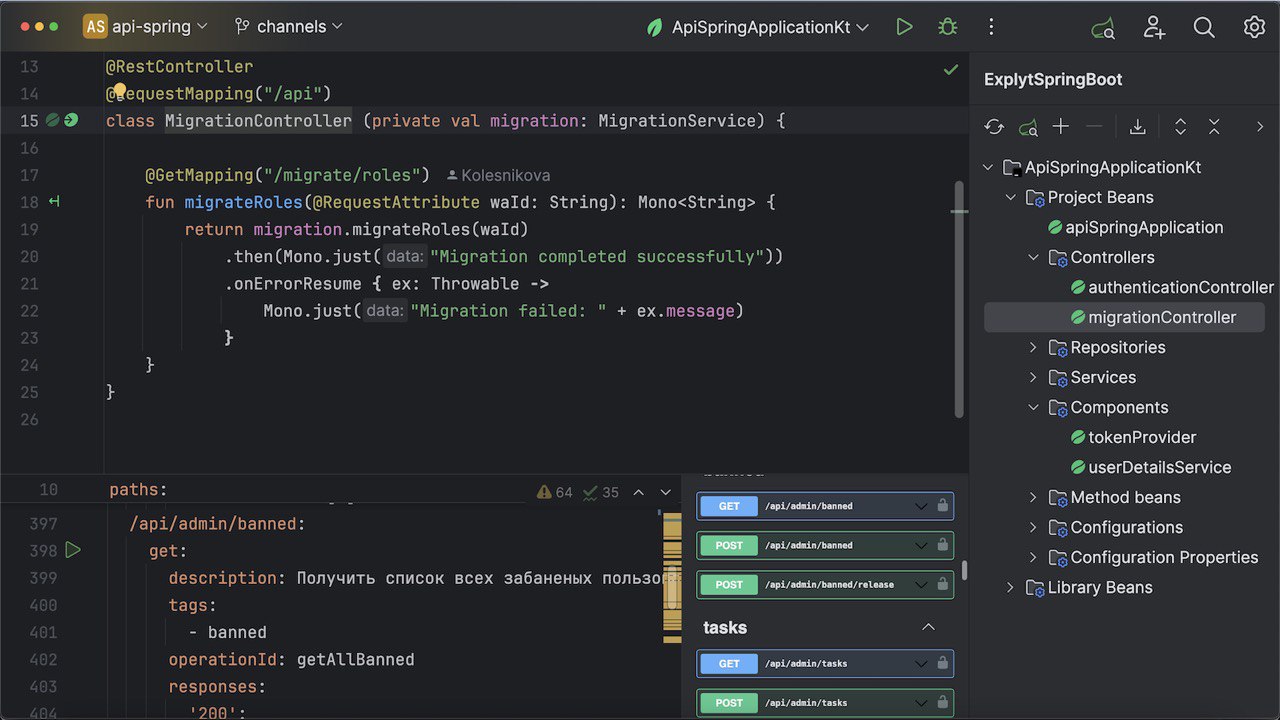
<p>Bring powerful Spring and Spring Boot tooling to IntelliJ IDEA Community Edition. Build, navigate, test, and debug faster with:</p>
<ul><li>Accurate bean discovery and real context understanding</li><li>Built‑in HTTP client (OpenAPI/Swagger UI + .http/.rest runners)</li><li>Spring Debugger</li><li>Quarkus CDI/JAX‑RS/AOP support</li><li>AI helpers for Spring tasks</li></ul>

<img width="800" alt="Screen" src="https://raw.githubusercontent.com/explyt/spring-plugin/refs/heads/main/images/screen1.jpg">


<h2>Why developers choose Explyt</h2>
<ul><li><strong>Faster feedback</strong>: precise inspections, completion and navigation eliminate wiring guesswork.</li><li><strong>Seamless API testing</strong>: run HTTP requests via <strong>Swagger UI in the IDE</strong> or execute <strong>.http/.rest</strong> files.</li><li><strong>True Spring context awareness</strong>: lightweight native context run (javaagent) extracts real bean/config metadata, including conditional and factory beans.</li></ul>

<h2>Highlights</h2>
<p><strong>Accurate Bean Detection &amp; Context Analysis</strong></p>
<ul><li>Detects beans via annotations, factory methods and conditional logic (@Conditional, profiles, complex scans).</li><li>Native context mode: runs a lightweight app with a javaagent to collect real bean metadata and eliminate false positives.</li><li><a href="https://github.com/user-attachments/assets/db380852-d239-4e0f-a1b2-15a3a2659f53">Video: How Native Context Mode works in Explyt Spring panel</a></li></ul>

<p><strong>HTTP Client: OpenAPI/Swagger UI + .http/.rest</strong></p>
<ul><li>Generate OpenAPI from Spring Web–annotated methods; open Swagger UI directly in the IDE.</li><li>Execute requests, inspect responses, copy cURL, and generate methods from URL/cURL (Java &amp; Kotlin).</li><li>Execute <strong>.http/.rest</strong> files with <strong>JetBrains HttpClient CLI</strong> or <strong>httpyac</strong>.</li><li><a href="https://github.com/user-attachments/assets/e38625a3-bc68-4075-9efa-945e64977f36">Video: How Explyt Endpoints Tool Window works</a></li></ul>

<img width="800" alt="OpenAPI" src="https://github.com/user-attachments/assets/a2c0d94c-9361-474d-a29b-07c7cb5e5e0c">


<p><strong>Spring Boot &amp; Web Enhancements</strong></p>
<ul><li><strong>Endpoints Tool Window</strong>: view and navigate controllers, routes and router functions (MVC/WebFlux).</li><li>Duplicate endpoint detection, OpenAPI validation, and better MockMvc/WebClient/WebTestClient support.</li></ul>

<img width="800" alt="Endpoints" src="https://github.com/user-attachments/assets/48b80d76-258e-4841-a4dc-fd59a9188d11" />


<p><strong>Spring Initializr</strong></p>
<ul><li>Create Spring Boot projects (Java/Kotlin) with improved templates from <a href="https://start.spring.io/">start.spring.io</a>.</li><li>Integrated user experience: create the Spring projects within IDE. </li><li>Will be always actual.  </li><li><a href="https://github.com/user-attachments/assets/a58ee561-356f-43cd-8db9-1fd5f3f62653">Video: Create New Project with Spring Explyt Initializr</a></li></ul>

<p><strong>Advanced Inspections &amp; Quick Fixes</strong></p>
<ul><li>ConfigurationProperties validation; property key suggestions; duplicate key detection; relaxed binding completions.</li><li>Autowiring checks (missing/multiple beans), proxyBeanMethods warnings, AOP-related inspections.</li><li>Resource reference verification and meta-annotation checks.</li></ul>

<p><strong>Spring Debugger</strong></p>
<ul><li>Dedicated run configuration with lightweight javaagent; shows Spring Context and Active Transaction in debugger tree.</li><li>Evaluate Spring context and call bean methods at breakpoints (<strong>Explyt.context</strong> helpers).</li><li>Inline run markers on Spring Data repositories to auto-populate Evaluate Expression during debug.</li></ul>

<p><strong>Spring Data</strong></p>
<ul><li>Repository method name validation; parameter/return type checks.</li><li>JPQL/SQL language injection and assistance; repository beans recognized for navigation/autowiring.</li></ul>

<img width="800" alt="JPQL" src="https://github.com/user-attachments/assets/c8d2058a-fe3e-458d-a06f-14e463528f8c">


<p><strong>Spring AOP</strong></p>
<ul><li>Detect risky internal calls to <code>@Transactional</code>/<code>@Async</code> methods; </li><li>line markers and navigation for aspects/advice.  </li></ul>

<img width="800" alt="AOP" src="https://github.com/user-attachments/assets/4398e82f-262e-4802-9ebe-e92170dc939b">


<p><strong>Quarkus support</strong></p>
<ul><li>CDI/DI navigation and inspections, JAX-RS endpoints, interceptors/decorators, Endpoints tool window.</li><li>Works by static analysis, many features available without running the app.</li></ul>

<p><strong>AI integration</strong></p>
<ul><li>AI actions: <ul><li>DB schema ↔ JPA entity, </li><li>Entity ↔ DTO, </li><li>controller ↔ OpenAPI round‑trips, </li><li>Spring config generators, </li><li>HTTP conversions.</li></ul></li><li>Works with OpenAI‑compatible providers or local models; requires IntelliJ Platform 2025.1+ for AI features.</li><li>Requires <a href="https://explyt.ai/download?utm_campaign=explytai&amp;utm_source=marketplace&amp;utm_medium=springexplyt">Explyt plugin</a> to enable AI features</li></ul>

<h2>Getting started</h2>
<ul><li>Open the <strong>Explyt Endpoints</strong> tool window (right sidebar) to explore and navigate all HTTP endpoints.</li><li>Use <strong>Link Explyt Spring Boot Project From RunConfiguration</strong> (native context) to extract runtime bean metadata for accurate inspections/navigation. </li></ul>

<img width="639" alt="image" src="https://github.com/user-attachments/assets/206a86b7-7e85-4756-8d24-a12add4fac96">


<ul><li>Run HTTP requests from Spring‑annotated methods via <strong>Swagger UI</strong> preview or from <strong>.http/.rest</strong> files using your configured runner.</li><li>Use <strong>Generate (Alt+Insert / Command+N)</strong> to create Spring Web methods from URL or cURL.</li></ul>

<h2>Installation</h2>
<ul><li><strong>.http/.rest runners</strong>: install <strong>JetBrains HttpClient CLI</strong> from plugin settings, or use <strong>httpyac</strong>.</li></ul>

<h2>Links</h2>
<ul><li><strong>Documentation</strong>: <a href="https://explyt.ai/docs/category/explyt-spring?utm_campaign=springexplyt&amp;utm_source=marketplace&amp;utm_medium=springexplyt">https://explyt.ai/docs/category/explyt-spring</a></li><li><strong>Source</strong>: <a href="https://github.com/explyt/spring-plugin">https://github.com/explyt/spring-plugin</a></li><li><strong>Full Changelog</strong>: <a href="https://github.com/explyt/spring-plugin/blob/main/CHANGELOG.md">https://github.com/explyt/spring-plugin/blob/main/CHANGELOG.md</a></li></ul>

<h2>Support &amp; community</h2>
<ul><li><strong>Issues/feature requests</strong>: <a href="https://github.com/explyt/spring-plugin/issues">https://github.com/explyt/spring-plugin/issues</a></li><li><strong>Telegram</strong>: <a href="https://t.me/explytspring">https://t.me/explytspring</a></li></ul>

<h2>License</h2>
<ul><li>Free for personal and commercial use. <a href="https://github.com/explyt/spring-plugin/blob/main/LICENSE.md">EULA and source license</a></li></ul>

<hr />

<h3>Search keywords</h3>
<p>spring boot intellij community plugin, idea community spring plugin, spring plugin for intellij, swagger ui http client, openapi client intellij, http client .http files, jetbrains http client cli, httpyac runner, spring debugger community, spring endpoints explorer, spring data repository inspection, configuration properties validation, bean injection navigation, autowiring inspection, spring initializr community, kotlin spring plugin, quarkus intellij community, java backend development, spring framework tooling</p>

<h3></h3>

<p><em>Thank you for using Explyt Spring Plugin!</em> — <a href="https://github.com/explyt/spring-plugin">please star</a>, contribute and share to help more developers discover it.</p>]]></description>
  </plugin>
  <plugin id="com.explyt.spring" url="https://github.com/explyt/spring-plugin/releases/download/261.33.80/spring-tool-253-b79-signed.zip" version="253.33.79">
    <idea-version since-build="253" until-build="265.*"/>
    <name>Spring Explyt</name>
    <vendor email="support@explyt.ai" url="https://explyt.ai/docs/category/explyt-spring/">Explyt</vendor>
    <category name="JVM Frameworks"/>
    <description><![CDATA[<h1>Explyt Spring Plugin — Free Spring Boot plugin for IntelliJ IDEA Community (Java, Kotlin, Quarkus)</h1>

<p>Bring powerful Spring and Spring Boot tooling to IntelliJ IDEA Community Edition. Build, navigate, test, and debug faster with:</p>
<ul><li>Accurate bean discovery and real context understanding</li><li>Built‑in HTTP client (OpenAPI/Swagger UI + .http/.rest runners)</li><li>Spring Debugger</li><li>Quarkus CDI/JAX‑RS/AOP support</li><li>AI helpers for Spring tasks</li></ul>

<img width="800" alt="Screen" src="https://raw.githubusercontent.com/explyt/spring-plugin/refs/heads/main/images/screen1.jpg">


<h2>Why developers choose Explyt</h2>
<ul><li><strong>Faster feedback</strong>: precise inspections, completion and navigation eliminate wiring guesswork.</li><li><strong>Seamless API testing</strong>: run HTTP requests via <strong>Swagger UI in the IDE</strong> or execute <strong>.http/.rest</strong> files.</li><li><strong>True Spring context awareness</strong>: lightweight native context run (javaagent) extracts real bean/config metadata, including conditional and factory beans.</li></ul>

<h2>Highlights</h2>
<p><strong>Accurate Bean Detection &amp; Context Analysis</strong></p>
<ul><li>Detects beans via annotations, factory methods and conditional logic (@Conditional, profiles, complex scans).</li><li>Native context mode: runs a lightweight app with a javaagent to collect real bean metadata and eliminate false positives.</li><li><a href="https://github.com/user-attachments/assets/db380852-d239-4e0f-a1b2-15a3a2659f53">Video: How Native Context Mode works in Explyt Spring panel</a></li></ul>

<p><strong>HTTP Client: OpenAPI/Swagger UI + .http/.rest</strong></p>
<ul><li>Generate OpenAPI from Spring Web–annotated methods; open Swagger UI directly in the IDE.</li><li>Execute requests, inspect responses, copy cURL, and generate methods from URL/cURL (Java &amp; Kotlin).</li><li>Execute <strong>.http/.rest</strong> files with <strong>JetBrains HttpClient CLI</strong> or <strong>httpyac</strong>.</li><li><a href="https://github.com/user-attachments/assets/e38625a3-bc68-4075-9efa-945e64977f36">Video: How Explyt Endpoints Tool Window works</a></li></ul>

<img width="800" alt="OpenAPI" src="https://github.com/user-attachments/assets/a2c0d94c-9361-474d-a29b-07c7cb5e5e0c">


<p><strong>Spring Boot &amp; Web Enhancements</strong></p>
<ul><li><strong>Endpoints Tool Window</strong>: view and navigate controllers, routes and router functions (MVC/WebFlux).</li><li>Duplicate endpoint detection, OpenAPI validation, and better MockMvc/WebClient/WebTestClient support.</li></ul>

<img width="800" alt="Endpoints" src="https://github.com/user-attachments/assets/48b80d76-258e-4841-a4dc-fd59a9188d11" />


<p><strong>Spring Initializr</strong></p>
<ul><li>Create Spring Boot projects (Java/Kotlin) with improved templates from <a href="https://start.spring.io/">start.spring.io</a>.</li><li>Integrated user experience: create the Spring projects within IDE. </li><li>Will be always actual.  </li><li><a href="https://github.com/user-attachments/assets/a58ee561-356f-43cd-8db9-1fd5f3f62653">Video: Create New Project with Spring Explyt Initializr</a></li></ul>

<p><strong>Advanced Inspections &amp; Quick Fixes</strong></p>
<ul><li>ConfigurationProperties validation; property key suggestions; duplicate key detection; relaxed binding completions.</li><li>Autowiring checks (missing/multiple beans), proxyBeanMethods warnings, AOP-related inspections.</li><li>Resource reference verification and meta-annotation checks.</li></ul>

<p><strong>Spring Debugger</strong></p>
<ul><li>Dedicated run configuration with lightweight javaagent; shows Spring Context and Active Transaction in debugger tree.</li><li>Evaluate Spring context and call bean methods at breakpoints (<strong>Explyt.context</strong> helpers).</li><li>Inline run markers on Spring Data repositories to auto-populate Evaluate Expression during debug.</li></ul>

<p><strong>Spring Data</strong></p>
<ul><li>Repository method name validation; parameter/return type checks.</li><li>JPQL/SQL language injection and assistance; repository beans recognized for navigation/autowiring.</li></ul>

<img width="800" alt="JPQL" src="https://github.com/user-attachments/assets/c8d2058a-fe3e-458d-a06f-14e463528f8c">


<p><strong>Spring AOP</strong></p>
<ul><li>Detect risky internal calls to <code>@Transactional</code>/<code>@Async</code> methods; </li><li>line markers and navigation for aspects/advice.  </li></ul>

<img width="800" alt="AOP" src="https://github.com/user-attachments/assets/4398e82f-262e-4802-9ebe-e92170dc939b">


<p><strong>Quarkus support</strong></p>
<ul><li>CDI/DI navigation and inspections, JAX-RS endpoints, interceptors/decorators, Endpoints tool window.</li><li>Works by static analysis, many features available without running the app.</li></ul>

<p><strong>AI integration</strong></p>
<ul><li>AI actions: <ul><li>DB schema ↔ JPA entity, </li><li>Entity ↔ DTO, </li><li>controller ↔ OpenAPI round‑trips, </li><li>Spring config generators, </li><li>HTTP conversions.</li></ul></li><li>Works with OpenAI‑compatible providers or local models; requires IntelliJ Platform 2025.1+ for AI features.</li><li>Requires <a href="https://explyt.ai/download?utm_campaign=explytai&amp;utm_source=marketplace&amp;utm_medium=springexplyt">Explyt plugin</a> to enable AI features</li></ul>

<h2>Getting started</h2>
<ul><li>Open the <strong>Explyt Endpoints</strong> tool window (right sidebar) to explore and navigate all HTTP endpoints.</li><li>Use <strong>Link Explyt Spring Boot Project From RunConfiguration</strong> (native context) to extract runtime bean metadata for accurate inspections/navigation. </li></ul>

<img width="639" alt="image" src="https://github.com/user-attachments/assets/206a86b7-7e85-4756-8d24-a12add4fac96">


<ul><li>Run HTTP requests from Spring‑annotated methods via <strong>Swagger UI</strong> preview or from <strong>.http/.rest</strong> files using your configured runner.</li><li>Use <strong>Generate (Alt+Insert / Command+N)</strong> to create Spring Web methods from URL or cURL.</li></ul>

<h2>Installation</h2>
<ul><li><strong>.http/.rest runners</strong>: install <strong>JetBrains HttpClient CLI</strong> from plugin settings, or use <strong>httpyac</strong>.</li></ul>

<h2>Links</h2>
<ul><li><strong>Documentation</strong>: <a href="https://explyt.ai/docs/category/explyt-spring?utm_campaign=springexplyt&amp;utm_source=marketplace&amp;utm_medium=springexplyt">https://explyt.ai/docs/category/explyt-spring</a></li><li><strong>Source</strong>: <a href="https://github.com/explyt/spring-plugin">https://github.com/explyt/spring-plugin</a></li><li><strong>Full Changelog</strong>: <a href="https://github.com/explyt/spring-plugin/blob/main/CHANGELOG.md">https://github.com/explyt/spring-plugin/blob/main/CHANGELOG.md</a></li></ul>

<h2>Support &amp; community</h2>
<ul><li><strong>Issues/feature requests</strong>: <a href="https://github.com/explyt/spring-plugin/issues">https://github.com/explyt/spring-plugin/issues</a></li><li><strong>Telegram</strong>: <a href="https://t.me/explytspring">https://t.me/explytspring</a></li></ul>

<h2>License</h2>
<ul><li>Free for personal and commercial use. <a href="https://github.com/explyt/spring-plugin/blob/main/LICENSE.md">EULA and source license</a></li></ul>

<hr />

<h3>Search keywords</h3>
<p>spring boot intellij community plugin, idea community spring plugin, spring plugin for intellij, swagger ui http client, openapi client intellij, http client .http files, jetbrains http client cli, httpyac runner, spring debugger community, spring endpoints explorer, spring data repository inspection, configuration properties validation, bean injection navigation, autowiring inspection, spring initializr community, kotlin spring plugin, quarkus intellij community, java backend development, spring framework tooling</p>

<h3></h3>

<p><em>Thank you for using Explyt Spring Plugin!</em> — <a href="https://github.com/explyt/spring-plugin">please star</a>, contribute and share to help more developers discover it.</p>]]></description>
  </plugin>
  <plugin id="com.explyt.spring" url="https://github.com/explyt/spring-plugin/releases/download/261.33.80/spring-tool-252-b86-signed.zip" version="252.33.86">
    <idea-version since-build="252.23892.409" until-build="252.*"/>
    <name>Spring Explyt</name>
    <vendor email="support@explyt.ai" url="https://explyt.ai/docs/category/explyt-spring/">Explyt</vendor>
    <category name="JVM Frameworks"/>
    <description><![CDATA[<h1>Explyt Spring Plugin — Free Spring Boot plugin for IntelliJ IDEA Community (Java, Kotlin, Quarkus)</h1>

<p>Bring powerful Spring and Spring Boot tooling to IntelliJ IDEA Community Edition. Build, navigate, test, and debug faster with:</p>
<ul><li>Accurate bean discovery and real context understanding</li><li>Built‑in HTTP client (OpenAPI/Swagger UI + .http/.rest runners)</li><li>Spring Debugger</li><li>Quarkus CDI/JAX‑RS/AOP support</li><li>AI helpers for Spring tasks</li></ul>

<img width="800" alt="Screen" src="https://raw.githubusercontent.com/explyt/spring-plugin/refs/heads/main/images/screen1.jpg">


<h2>Why developers choose Explyt</h2>
<ul><li><strong>Faster feedback</strong>: precise inspections, completion and navigation eliminate wiring guesswork.</li><li><strong>Seamless API testing</strong>: run HTTP requests via <strong>Swagger UI in the IDE</strong> or execute <strong>.http/.rest</strong> files.</li><li><strong>True Spring context awareness</strong>: lightweight native context run (javaagent) extracts real bean/config metadata, including conditional and factory beans.</li></ul>

<h2>Highlights</h2>
<p><strong>Accurate Bean Detection &amp; Context Analysis</strong></p>
<ul><li>Detects beans via annotations, factory methods and conditional logic (@Conditional, profiles, complex scans).</li><li>Native context mode: runs a lightweight app with a javaagent to collect real bean metadata and eliminate false positives.</li><li><a href="https://github.com/user-attachments/assets/db380852-d239-4e0f-a1b2-15a3a2659f53">Video: How Native Context Mode works in Explyt Spring panel</a></li></ul>

<p><strong>HTTP Client: OpenAPI/Swagger UI + .http/.rest</strong></p>
<ul><li>Generate OpenAPI from Spring Web–annotated methods; open Swagger UI directly in the IDE.</li><li>Execute requests, inspect responses, copy cURL, and generate methods from URL/cURL (Java &amp; Kotlin).</li><li>Execute <strong>.http/.rest</strong> files with <strong>JetBrains HttpClient CLI</strong> or <strong>httpyac</strong>.</li><li><a href="https://github.com/user-attachments/assets/e38625a3-bc68-4075-9efa-945e64977f36">Video: How Explyt Endpoints Tool Window works</a></li></ul>

<img width="800" alt="OpenAPI" src="https://github.com/user-attachments/assets/a2c0d94c-9361-474d-a29b-07c7cb5e5e0c">


<p><strong>Spring Boot &amp; Web Enhancements</strong></p>
<ul><li><strong>Endpoints Tool Window</strong>: view and navigate controllers, routes and router functions (MVC/WebFlux).</li><li>Duplicate endpoint detection, OpenAPI validation, and better MockMvc/WebClient/WebTestClient support.</li></ul>

<img width="800" alt="Endpoints" src="https://github.com/user-attachments/assets/48b80d76-258e-4841-a4dc-fd59a9188d11" />


<p><strong>Spring Initializr</strong></p>
<ul><li>Create Spring Boot projects (Java/Kotlin) with improved templates from <a href="https://start.spring.io/">start.spring.io</a>.</li><li>Integrated user experience: create the Spring projects within IDE. </li><li>Will be always actual.  </li><li><a href="https://github.com/user-attachments/assets/a58ee561-356f-43cd-8db9-1fd5f3f62653">Video: Create New Project with Spring Explyt Initializr</a></li></ul>

<p><strong>Advanced Inspections &amp; Quick Fixes</strong></p>
<ul><li>ConfigurationProperties validation; property key suggestions; duplicate key detection; relaxed binding completions.</li><li>Autowiring checks (missing/multiple beans), proxyBeanMethods warnings, AOP-related inspections.</li><li>Resource reference verification and meta-annotation checks.</li></ul>

<p><strong>Spring Debugger</strong></p>
<ul><li>Dedicated run configuration with lightweight javaagent; shows Spring Context and Active Transaction in debugger tree.</li><li>Evaluate Spring context and call bean methods at breakpoints (<strong>Explyt.context</strong> helpers).</li><li>Inline run markers on Spring Data repositories to auto-populate Evaluate Expression during debug.</li></ul>

<p><strong>Spring Data</strong></p>
<ul><li>Repository method name validation; parameter/return type checks.</li><li>JPQL/SQL language injection and assistance; repository beans recognized for navigation/autowiring.</li></ul>

<img width="800" alt="JPQL" src="https://github.com/user-attachments/assets/c8d2058a-fe3e-458d-a06f-14e463528f8c">


<p><strong>Spring AOP</strong></p>
<ul><li>Detect risky internal calls to <code>@Transactional</code>/<code>@Async</code> methods; </li><li>line markers and navigation for aspects/advice.  </li></ul>

<img width="800" alt="AOP" src="https://github.com/user-attachments/assets/4398e82f-262e-4802-9ebe-e92170dc939b">


<p><strong>Quarkus support</strong></p>
<ul><li>CDI/DI navigation and inspections, JAX-RS endpoints, interceptors/decorators, Endpoints tool window.</li><li>Works by static analysis, many features available without running the app.</li></ul>

<p><strong>AI integration</strong></p>
<ul><li>AI actions: <ul><li>DB schema ↔ JPA entity, </li><li>Entity ↔ DTO, </li><li>controller ↔ OpenAPI round‑trips, </li><li>Spring config generators, </li><li>HTTP conversions.</li></ul></li><li>Works with OpenAI‑compatible providers or local models; requires IntelliJ Platform 2025.1+ for AI features.</li><li>Requires <a href="https://explyt.ai/download?utm_campaign=explytai&amp;utm_source=marketplace&amp;utm_medium=springexplyt">Explyt plugin</a> to enable AI features</li></ul>

<h2>Getting started</h2>
<ul><li>Open the <strong>Explyt Endpoints</strong> tool window (right sidebar) to explore and navigate all HTTP endpoints.</li><li>Use <strong>Link Explyt Spring Boot Project From RunConfiguration</strong> (native context) to extract runtime bean metadata for accurate inspections/navigation. </li></ul>

<img width="639" alt="image" src="https://github.com/user-attachments/assets/206a86b7-7e85-4756-8d24-a12add4fac96">


<ul><li>Run HTTP requests from Spring‑annotated methods via <strong>Swagger UI</strong> preview or from <strong>.http/.rest</strong> files using your configured runner.</li><li>Use <strong>Generate (Alt+Insert / Command+N)</strong> to create Spring Web methods from URL or cURL.</li></ul>

<h2>Installation</h2>
<ul><li><strong>.http/.rest runners</strong>: install <strong>JetBrains HttpClient CLI</strong> from plugin settings, or use <strong>httpyac</strong>.</li></ul>

<h2>Links</h2>
<ul><li><strong>Documentation</strong>: <a href="https://explyt.ai/docs/category/explyt-spring?utm_campaign=springexplyt&amp;utm_source=marketplace&amp;utm_medium=springexplyt">https://explyt.ai/docs/category/explyt-spring</a></li><li><strong>Source</strong>: <a href="https://github.com/explyt/spring-plugin">https://github.com/explyt/spring-plugin</a></li><li><strong>Full Changelog</strong>: <a href="https://github.com/explyt/spring-plugin/blob/main/CHANGELOG.md">https://github.com/explyt/spring-plugin/blob/main/CHANGELOG.md</a></li></ul>

<h2>Support &amp; community</h2>
<ul><li><strong>Issues/feature requests</strong>: <a href="https://github.com/explyt/spring-plugin/issues">https://github.com/explyt/spring-plugin/issues</a></li><li><strong>Telegram</strong>: <a href="https://t.me/explytspring">https://t.me/explytspring</a></li></ul>

<h2>License</h2>
<ul><li>Free for personal and commercial use. <a href="https://github.com/explyt/spring-plugin/blob/main/LICENSE.md">EULA and source license</a></li></ul>

<hr />

<h3>Search keywords</h3>
<p>spring boot intellij community plugin, idea community spring plugin, spring plugin for intellij, swagger ui http client, openapi client intellij, http client .http files, jetbrains http client cli, httpyac runner, spring debugger community, spring endpoints explorer, spring data repository inspection, configuration properties validation, bean injection navigation, autowiring inspection, spring initializr community, kotlin spring plugin, quarkus intellij community, java backend development, spring framework tooling</p>

<h3></h3>

<p><em>Thank you for using Explyt Spring Plugin!</em> — <a href="https://github.com/explyt/spring-plugin">please star</a>, contribute and share to help more developers discover it.</p>]]></description>
  </plugin>
  <plugin id="com.explyt.spring" url="https://github.com/explyt/spring-plugin/releases/download/261.33.80/spring-tool-251-b82-signed.zip" version="251.33.82">
    <idea-version since-build="251.18673.35" until-build="251.*"/>
    <name>Spring Explyt</name>
    <vendor email="support@explyt.ai" url="https://explyt.ai/docs/category/explyt-spring/">Explyt</vendor>
    <category name="JVM Frameworks"/>
    <description><![CDATA[<h1>Explyt Spring Plugin — Free Spring Boot plugin for IntelliJ IDEA Community (Java, Kotlin, Quarkus)</h1>

<p>Bring powerful Spring and Spring Boot tooling to IntelliJ IDEA Community Edition. Build, navigate, test, and debug faster with:</p>
<ul><li>Accurate bean discovery and real context understanding</li><li>Built‑in HTTP client (OpenAPI/Swagger UI + .http/.rest runners)</li><li>Spring Debugger</li><li>Quarkus CDI/JAX‑RS/AOP support</li><li>AI helpers for Spring tasks</li></ul>

<img width="800" alt="Screen" src="https://raw.githubusercontent.com/explyt/spring-plugin/refs/heads/main/images/screen1.jpg">


<h2>Why developers choose Explyt</h2>
<ul><li><strong>Faster feedback</strong>: precise inspections, completion and navigation eliminate wiring guesswork.</li><li><strong>Seamless API testing</strong>: run HTTP requests via <strong>Swagger UI in the IDE</strong> or execute <strong>.http/.rest</strong> files.</li><li><strong>True Spring context awareness</strong>: lightweight native context run (javaagent) extracts real bean/config metadata, including conditional and factory beans.</li></ul>

<h2>Highlights</h2>
<p><strong>Accurate Bean Detection &amp; Context Analysis</strong></p>
<ul><li>Detects beans via annotations, factory methods and conditional logic (@Conditional, profiles, complex scans).</li><li>Native context mode: runs a lightweight app with a javaagent to collect real bean metadata and eliminate false positives.</li><li><a href="https://github.com/user-attachments/assets/db380852-d239-4e0f-a1b2-15a3a2659f53">Video: How Native Context Mode works in Explyt Spring panel</a></li></ul>

<p><strong>HTTP Client: OpenAPI/Swagger UI + .http/.rest</strong></p>
<ul><li>Generate OpenAPI from Spring Web–annotated methods; open Swagger UI directly in the IDE.</li><li>Execute requests, inspect responses, copy cURL, and generate methods from URL/cURL (Java &amp; Kotlin).</li><li>Execute <strong>.http/.rest</strong> files with <strong>JetBrains HttpClient CLI</strong> or <strong>httpyac</strong>.</li><li><a href="https://github.com/user-attachments/assets/e38625a3-bc68-4075-9efa-945e64977f36">Video: How Explyt Endpoints Tool Window works</a></li></ul>

<img width="800" alt="OpenAPI" src="https://github.com/user-attachments/assets/a2c0d94c-9361-474d-a29b-07c7cb5e5e0c">


<p><strong>Spring Boot &amp; Web Enhancements</strong></p>
<ul><li><strong>Endpoints Tool Window</strong>: view and navigate controllers, routes and router functions (MVC/WebFlux).</li><li>Duplicate endpoint detection, OpenAPI validation, and better MockMvc/WebClient/WebTestClient support.</li></ul>

<img width="800" alt="Endpoints" src="https://github.com/user-attachments/assets/48b80d76-258e-4841-a4dc-fd59a9188d11" />


<p><strong>Spring Initializr</strong></p>
<ul><li>Create Spring Boot projects (Java/Kotlin) with improved templates from <a href="https://start.spring.io/">start.spring.io</a>.</li><li>Integrated user experience: create the Spring projects within IDE. </li><li>Will be always actual.  </li><li><a href="https://github.com/user-attachments/assets/a58ee561-356f-43cd-8db9-1fd5f3f62653">Video: Create New Project with Spring Explyt Initializr</a></li></ul>

<p><strong>Advanced Inspections &amp; Quick Fixes</strong></p>
<ul><li>ConfigurationProperties validation; property key suggestions; duplicate key detection; relaxed binding completions.</li><li>Autowiring checks (missing/multiple beans), proxyBeanMethods warnings, AOP-related inspections.</li><li>Resource reference verification and meta-annotation checks.</li></ul>

<p><strong>Spring Debugger</strong></p>
<ul><li>Dedicated run configuration with lightweight javaagent; shows Spring Context and Active Transaction in debugger tree.</li><li>Evaluate Spring context and call bean methods at breakpoints (<strong>Explyt.context</strong> helpers).</li><li>Inline run markers on Spring Data repositories to auto-populate Evaluate Expression during debug.</li></ul>

<p><strong>Spring Data</strong></p>
<ul><li>Repository method name validation; parameter/return type checks.</li><li>JPQL/SQL language injection and assistance; repository beans recognized for navigation/autowiring.</li></ul>

<img width="800" alt="JPQL" src="https://github.com/user-attachments/assets/c8d2058a-fe3e-458d-a06f-14e463528f8c">


<p><strong>Spring AOP</strong></p>
<ul><li>Detect risky internal calls to <code>@Transactional</code>/<code>@Async</code> methods; </li><li>line markers and navigation for aspects/advice.  </li></ul>

<img width="800" alt="AOP" src="https://github.com/user-attachments/assets/4398e82f-262e-4802-9ebe-e92170dc939b">


<p><strong>Quarkus support</strong></p>
<ul><li>CDI/DI navigation and inspections, JAX-RS endpoints, interceptors/decorators, Endpoints tool window.</li><li>Works by static analysis, many features available without running the app.</li></ul>

<p><strong>AI integration</strong></p>
<ul><li>AI actions: <ul><li>DB schema ↔ JPA entity, </li><li>Entity ↔ DTO, </li><li>controller ↔ OpenAPI round‑trips, </li><li>Spring config generators, </li><li>HTTP conversions.</li></ul></li><li>Works with OpenAI‑compatible providers or local models; requires IntelliJ Platform 2025.1+ for AI features.</li><li>Requires <a href="https://explyt.ai/download?utm_campaign=explytai&amp;utm_source=marketplace&amp;utm_medium=springexplyt">Explyt plugin</a> to enable AI features</li></ul>

<h2>Getting started</h2>
<ul><li>Open the <strong>Explyt Endpoints</strong> tool window (right sidebar) to explore and navigate all HTTP endpoints.</li><li>Use <strong>Link Explyt Spring Boot Project From RunConfiguration</strong> (native context) to extract runtime bean metadata for accurate inspections/navigation. </li></ul>

<img width="639" alt="image" src="https://github.com/user-attachments/assets/206a86b7-7e85-4756-8d24-a12add4fac96">


<ul><li>Run HTTP requests from Spring‑annotated methods via <strong>Swagger UI</strong> preview or from <strong>.http/.rest</strong> files using your configured runner.</li><li>Use <strong>Generate (Alt+Insert / Command+N)</strong> to create Spring Web methods from URL or cURL.</li></ul>

<h2>Installation</h2>
<ul><li><strong>.http/.rest runners</strong>: install <strong>JetBrains HttpClient CLI</strong> from plugin settings, or use <strong>httpyac</strong>.</li></ul>

<h2>Links</h2>
<ul><li><strong>Documentation</strong>: <a href="https://explyt.ai/docs/category/explyt-spring?utm_campaign=springexplyt&amp;utm_source=marketplace&amp;utm_medium=springexplyt">https://explyt.ai/docs/category/explyt-spring</a></li><li><strong>Source</strong>: <a href="https://github.com/explyt/spring-plugin">https://github.com/explyt/spring-plugin</a></li><li><strong>Full Changelog</strong>: <a href="https://github.com/explyt/spring-plugin/blob/main/CHANGELOG.md">https://github.com/explyt/spring-plugin/blob/main/CHANGELOG.md</a></li></ul>

<h2>Support &amp; community</h2>
<ul><li><strong>Issues/feature requests</strong>: <a href="https://github.com/explyt/spring-plugin/issues">https://github.com/explyt/spring-plugin/issues</a></li><li><strong>Telegram</strong>: <a href="https://t.me/explytspring">https://t.me/explytspring</a></li></ul>

<h2>License</h2>
<ul><li>Free for personal and commercial use. <a href="https://github.com/explyt/spring-plugin/blob/main/LICENSE.md">EULA and source license</a></li></ul>

<hr />

<h3>Search keywords</h3>
<p>spring boot intellij community plugin, idea community spring plugin, spring plugin for intellij, swagger ui http client, openapi client intellij, http client .http files, jetbrains http client cli, httpyac runner, spring debugger community, spring endpoints explorer, spring data repository inspection, configuration properties validation, bean injection navigation, autowiring inspection, spring initializr community, kotlin spring plugin, quarkus intellij community, java backend development, spring framework tooling</p>

<h3></h3>

<p><em>Thank you for using Explyt Spring Plugin!</em> — <a href="https://github.com/explyt/spring-plugin">please star</a>, contribute and share to help more developers discover it.</p>]]></description>
  </plugin>
  <plugin id="com.explyt.spring" url="https://github.com/explyt/spring-plugin/releases/download/261.33.80/spring-tool-243-b83-signed.zip" version="243.33.83">
    <idea-version since-build="243" until-build="243.*"/>
    <name>Spring Explyt</name>
    <vendor email="support@explyt.ai" url="https://explyt.ai/docs/category/explyt-spring/">Explyt</vendor>
    <category name="JVM Frameworks"/>
    <description><![CDATA[<h1>Explyt Spring Plugin — Free Spring Boot plugin for IntelliJ IDEA Community (Java, Kotlin, Quarkus)</h1>

<p>Bring powerful Spring and Spring Boot tooling to IntelliJ IDEA Community Edition. Build, navigate, test, and debug faster with:</p>
<ul><li>Accurate bean discovery and real context understanding</li><li>Built‑in HTTP client (OpenAPI/Swagger UI + .http/.rest runners)</li><li>Spring Debugger</li><li>Quarkus CDI/JAX‑RS/AOP support</li><li>AI helpers for Spring tasks</li></ul>

<img width="800" alt="Screen" src="https://raw.githubusercontent.com/explyt/spring-plugin/refs/heads/main/images/screen1.jpg">


<h2>Why developers choose Explyt</h2>
<ul><li><strong>Faster feedback</strong>: precise inspections, completion and navigation eliminate wiring guesswork.</li><li><strong>Seamless API testing</strong>: run HTTP requests via <strong>Swagger UI in the IDE</strong> or execute <strong>.http/.rest</strong> files.</li><li><strong>True Spring context awareness</strong>: lightweight native context run (javaagent) extracts real bean/config metadata, including conditional and factory beans.</li></ul>

<h2>Highlights</h2>
<p><strong>Accurate Bean Detection &amp; Context Analysis</strong></p>
<ul><li>Detects beans via annotations, factory methods and conditional logic (@Conditional, profiles, complex scans).</li><li>Native context mode: runs a lightweight app with a javaagent to collect real bean metadata and eliminate false positives.</li><li><a href="https://github.com/user-attachments/assets/db380852-d239-4e0f-a1b2-15a3a2659f53">Video: How Native Context Mode works in Explyt Spring panel</a></li></ul>

<p><strong>HTTP Client: OpenAPI/Swagger UI + .http/.rest</strong></p>
<ul><li>Generate OpenAPI from Spring Web–annotated methods; open Swagger UI directly in the IDE.</li><li>Execute requests, inspect responses, copy cURL, and generate methods from URL/cURL (Java &amp; Kotlin).</li><li>Execute <strong>.http/.rest</strong> files with <strong>JetBrains HttpClient CLI</strong> or <strong>httpyac</strong>.</li><li><a href="https://github.com/user-attachments/assets/e38625a3-bc68-4075-9efa-945e64977f36">Video: How Explyt Endpoints Tool Window works</a></li></ul>

<img width="800" alt="OpenAPI" src="https://github.com/user-attachments/assets/a2c0d94c-9361-474d-a29b-07c7cb5e5e0c">


<p><strong>Spring Boot &amp; Web Enhancements</strong></p>
<ul><li><strong>Endpoints Tool Window</strong>: view and navigate controllers, routes and router functions (MVC/WebFlux).</li><li>Duplicate endpoint detection, OpenAPI validation, and better MockMvc/WebClient/WebTestClient support.</li></ul>

<img width="800" alt="Endpoints" src="https://github.com/user-attachments/assets/48b80d76-258e-4841-a4dc-fd59a9188d11" />


<p><strong>Spring Initializr</strong></p>
<ul><li>Create Spring Boot projects (Java/Kotlin) with improved templates from <a href="https://start.spring.io/">start.spring.io</a>.</li><li>Integrated user experience: create the Spring projects within IDE. </li><li>Will be always actual.  </li><li><a href="https://github.com/user-attachments/assets/a58ee561-356f-43cd-8db9-1fd5f3f62653">Video: Create New Project with Spring Explyt Initializr</a></li></ul>

<p><strong>Advanced Inspections &amp; Quick Fixes</strong></p>
<ul><li>ConfigurationProperties validation; property key suggestions; duplicate key detection; relaxed binding completions.</li><li>Autowiring checks (missing/multiple beans), proxyBeanMethods warnings, AOP-related inspections.</li><li>Resource reference verification and meta-annotation checks.</li></ul>

<p><strong>Spring Debugger</strong></p>
<ul><li>Dedicated run configuration with lightweight javaagent; shows Spring Context and Active Transaction in debugger tree.</li><li>Evaluate Spring context and call bean methods at breakpoints (<strong>Explyt.context</strong> helpers).</li><li>Inline run markers on Spring Data repositories to auto-populate Evaluate Expression during debug.</li></ul>

<p><strong>Spring Data</strong></p>
<ul><li>Repository method name validation; parameter/return type checks.</li><li>JPQL/SQL language injection and assistance; repository beans recognized for navigation/autowiring.</li></ul>

<img width="800" alt="JPQL" src="https://github.com/user-attachments/assets/c8d2058a-fe3e-458d-a06f-14e463528f8c">


<p><strong>Spring AOP</strong></p>
<ul><li>Detect risky internal calls to <code>@Transactional</code>/<code>@Async</code> methods; </li><li>line markers and navigation for aspects/advice.  </li></ul>

<img width="800" alt="AOP" src="https://github.com/user-attachments/assets/4398e82f-262e-4802-9ebe-e92170dc939b">


<p><strong>Quarkus support</strong></p>
<ul><li>CDI/DI navigation and inspections, JAX-RS endpoints, interceptors/decorators, Endpoints tool window.</li><li>Works by static analysis, many features available without running the app.</li></ul>

<p><strong>AI integration</strong></p>
<ul><li>AI actions: <ul><li>DB schema ↔ JPA entity, </li><li>Entity ↔ DTO, </li><li>controller ↔ OpenAPI round‑trips, </li><li>Spring config generators, </li><li>HTTP conversions.</li></ul></li><li>Works with OpenAI‑compatible providers or local models; requires IntelliJ Platform 2025.1+ for AI features.</li><li>Requires <a href="https://explyt.ai/download?utm_campaign=explytai&amp;utm_source=marketplace&amp;utm_medium=springexplyt">Explyt plugin</a> to enable AI features</li></ul>

<h2>Getting started</h2>
<ul><li>Open the <strong>Explyt Endpoints</strong> tool window (right sidebar) to explore and navigate all HTTP endpoints.</li><li>Use <strong>Link Explyt Spring Boot Project From RunConfiguration</strong> (native context) to extract runtime bean metadata for accurate inspections/navigation. </li></ul>

<img width="639" alt="image" src="https://github.com/user-attachments/assets/206a86b7-7e85-4756-8d24-a12add4fac96">


<ul><li>Run HTTP requests from Spring‑annotated methods via <strong>Swagger UI</strong> preview or from <strong>.http/.rest</strong> files using your configured runner.</li><li>Use <strong>Generate (Alt+Insert / Command+N)</strong> to create Spring Web methods from URL or cURL.</li></ul>

<h2>Installation</h2>
<ul><li><strong>.http/.rest runners</strong>: install <strong>JetBrains HttpClient CLI</strong> from plugin settings, or use <strong>httpyac</strong>.</li></ul>

<h2>Links</h2>
<ul><li><strong>Documentation</strong>: <a href="https://explyt.ai/docs/category/explyt-spring?utm_campaign=springexplyt&amp;utm_source=marketplace&amp;utm_medium=springexplyt">https://explyt.ai/docs/category/explyt-spring</a></li><li><strong>Source</strong>: <a href="https://github.com/explyt/spring-plugin">https://github.com/explyt/spring-plugin</a></li><li><strong>Full Changelog</strong>: <a href="https://github.com/explyt/spring-plugin/blob/main/CHANGELOG.md">https://github.com/explyt/spring-plugin/blob/main/CHANGELOG.md</a></li></ul>

<h2>Support &amp; community</h2>
<ul><li><strong>Issues/feature requests</strong>: <a href="https://github.com/explyt/spring-plugin/issues">https://github.com/explyt/spring-plugin/issues</a></li><li><strong>Telegram</strong>: <a href="https://t.me/explytspring">https://t.me/explytspring</a></li></ul>

<h2>License</h2>
<ul><li>Free for personal and commercial use. <a href="https://github.com/explyt/spring-plugin/blob/main/LICENSE.md">EULA and source license</a></li></ul>

<hr />

<h3>Search keywords</h3>
<p>spring boot intellij community plugin, idea community spring plugin, spring plugin for intellij, swagger ui http client, openapi client intellij, http client .http files, jetbrains http client cli, httpyac runner, spring debugger community, spring endpoints explorer, spring data repository inspection, configuration properties validation, bean injection navigation, autowiring inspection, spring initializr community, kotlin spring plugin, quarkus intellij community, java backend development, spring framework tooling</p>

<h3></h3>

<p><em>Thank you for using Explyt Spring Plugin!</em> — <a href="https://github.com/explyt/spring-plugin">please star</a>, contribute and share to help more developers discover it.</p>]]></description>
  </plugin>
  <plugin id="com.explyt.spring" url="https://github.com/explyt/spring-plugin/releases/download/261.33.80/spring-tool-242-b85-signed.zip" version="242.33.85">
    <idea-version since-build="242" until-build="242.*"/>
    <name>Spring Explyt</name>
    <vendor email="support@explyt.ai" url="https://explyt.ai/docs/category/explyt-spring/">Explyt</vendor>
    <category name="JVM Frameworks"/>
    <description><![CDATA[<h1>Explyt Spring Plugin — Free Spring Boot plugin for IntelliJ IDEA Community (Java, Kotlin, Quarkus)</h1>

<p>Bring powerful Spring and Spring Boot tooling to IntelliJ IDEA Community Edition. Build, navigate, test, and debug faster with:</p>
<ul><li>Accurate bean discovery and real context understanding</li><li>Built‑in HTTP client (OpenAPI/Swagger UI + .http/.rest runners)</li><li>Spring Debugger</li><li>Quarkus CDI/JAX‑RS/AOP support</li><li>AI helpers for Spring tasks</li></ul>

<img width="800" alt="Screen" src="https://raw.githubusercontent.com/explyt/spring-plugin/refs/heads/main/images/screen1.jpg">


<h2>Why developers choose Explyt</h2>
<ul><li><strong>Faster feedback</strong>: precise inspections, completion and navigation eliminate wiring guesswork.</li><li><strong>Seamless API testing</strong>: run HTTP requests via <strong>Swagger UI in the IDE</strong> or execute <strong>.http/.rest</strong> files.</li><li><strong>True Spring context awareness</strong>: lightweight native context run (javaagent) extracts real bean/config metadata, including conditional and factory beans.</li></ul>

<h2>Highlights</h2>
<p><strong>Accurate Bean Detection &amp; Context Analysis</strong></p>
<ul><li>Detects beans via annotations, factory methods and conditional logic (@Conditional, profiles, complex scans).</li><li>Native context mode: runs a lightweight app with a javaagent to collect real bean metadata and eliminate false positives.</li><li><a href="https://github.com/user-attachments/assets/db380852-d239-4e0f-a1b2-15a3a2659f53">Video: How Native Context Mode works in Explyt Spring panel</a></li></ul>

<p><strong>HTTP Client: OpenAPI/Swagger UI + .http/.rest</strong></p>
<ul><li>Generate OpenAPI from Spring Web–annotated methods; open Swagger UI directly in the IDE.</li><li>Execute requests, inspect responses, copy cURL, and generate methods from URL/cURL (Java &amp; Kotlin).</li><li>Execute <strong>.http/.rest</strong> files with <strong>JetBrains HttpClient CLI</strong> or <strong>httpyac</strong>.</li><li><a href="https://github.com/user-attachments/assets/e38625a3-bc68-4075-9efa-945e64977f36">Video: How Explyt Endpoints Tool Window works</a></li></ul>

<img width="800" alt="OpenAPI" src="https://github.com/user-attachments/assets/a2c0d94c-9361-474d-a29b-07c7cb5e5e0c">


<p><strong>Spring Boot &amp; Web Enhancements</strong></p>
<ul><li><strong>Endpoints Tool Window</strong>: view and navigate controllers, routes and router functions (MVC/WebFlux).</li><li>Duplicate endpoint detection, OpenAPI validation, and better MockMvc/WebClient/WebTestClient support.</li></ul>

<img width="800" alt="Endpoints" src="https://github.com/user-attachments/assets/48b80d76-258e-4841-a4dc-fd59a9188d11" />


<p><strong>Spring Initializr</strong></p>
<ul><li>Create Spring Boot projects (Java/Kotlin) with improved templates from <a href="https://start.spring.io/">start.spring.io</a>.</li><li>Integrated user experience: create the Spring projects within IDE. </li><li>Will be always actual.  </li><li><a href="https://github.com/user-attachments/assets/a58ee561-356f-43cd-8db9-1fd5f3f62653">Video: Create New Project with Spring Explyt Initializr</a></li></ul>

<p><strong>Advanced Inspections &amp; Quick Fixes</strong></p>
<ul><li>ConfigurationProperties validation; property key suggestions; duplicate key detection; relaxed binding completions.</li><li>Autowiring checks (missing/multiple beans), proxyBeanMethods warnings, AOP-related inspections.</li><li>Resource reference verification and meta-annotation checks.</li></ul>

<p><strong>Spring Debugger</strong></p>
<ul><li>Dedicated run configuration with lightweight javaagent; shows Spring Context and Active Transaction in debugger tree.</li><li>Evaluate Spring context and call bean methods at breakpoints (<strong>Explyt.context</strong> helpers).</li><li>Inline run markers on Spring Data repositories to auto-populate Evaluate Expression during debug.</li></ul>

<p><strong>Spring Data</strong></p>
<ul><li>Repository method name validation; parameter/return type checks.</li><li>JPQL/SQL language injection and assistance; repository beans recognized for navigation/autowiring.</li></ul>

<img width="800" alt="JPQL" src="https://github.com/user-attachments/assets/c8d2058a-fe3e-458d-a06f-14e463528f8c">


<p><strong>Spring AOP</strong></p>
<ul><li>Detect risky internal calls to <code>@Transactional</code>/<code>@Async</code> methods; </li><li>line markers and navigation for aspects/advice.  </li></ul>

<img width="800" alt="AOP" src="https://github.com/user-attachments/assets/4398e82f-262e-4802-9ebe-e92170dc939b">


<p><strong>Quarkus support</strong></p>
<ul><li>CDI/DI navigation and inspections, JAX-RS endpoints, interceptors/decorators, Endpoints tool window.</li><li>Works by static analysis, many features available without running the app.</li></ul>

<p><strong>AI integration</strong></p>
<ul><li>AI actions: <ul><li>DB schema ↔ JPA entity, </li><li>Entity ↔ DTO, </li><li>controller ↔ OpenAPI round‑trips, </li><li>Spring config generators, </li><li>HTTP conversions.</li></ul></li><li>Works with OpenAI‑compatible providers or local models; requires IntelliJ Platform 2025.1+ for AI features.</li><li>Requires <a href="https://explyt.ai/download?utm_campaign=explytai&amp;utm_source=marketplace&amp;utm_medium=springexplyt">Explyt plugin</a> to enable AI features</li></ul>

<h2>Getting started</h2>
<ul><li>Open the <strong>Explyt Endpoints</strong> tool window (right sidebar) to explore and navigate all HTTP endpoints.</li><li>Use <strong>Link Explyt Spring Boot Project From RunConfiguration</strong> (native context) to extract runtime bean metadata for accurate inspections/navigation. </li></ul>

<img width="639" alt="image" src="https://github.com/user-attachments/assets/206a86b7-7e85-4756-8d24-a12add4fac96">


<ul><li>Run HTTP requests from Spring‑annotated methods via <strong>Swagger UI</strong> preview or from <strong>.http/.rest</strong> files using your configured runner.</li><li>Use <strong>Generate (Alt+Insert / Command+N)</strong> to create Spring Web methods from URL or cURL.</li></ul>

<h2>Installation</h2>
<ul><li><strong>.http/.rest runners</strong>: install <strong>JetBrains HttpClient CLI</strong> from plugin settings, or use <strong>httpyac</strong>.</li></ul>

<h2>Links</h2>
<ul><li><strong>Documentation</strong>: <a href="https://explyt.ai/docs/category/explyt-spring?utm_campaign=springexplyt&amp;utm_source=marketplace&amp;utm_medium=springexplyt">https://explyt.ai/docs/category/explyt-spring</a></li><li><strong>Source</strong>: <a href="https://github.com/explyt/spring-plugin">https://github.com/explyt/spring-plugin</a></li><li><strong>Full Changelog</strong>: <a href="https://github.com/explyt/spring-plugin/blob/main/CHANGELOG.md">https://github.com/explyt/spring-plugin/blob/main/CHANGELOG.md</a></li></ul>

<h2>Support &amp; community</h2>
<ul><li><strong>Issues/feature requests</strong>: <a href="https://github.com/explyt/spring-plugin/issues">https://github.com/explyt/spring-plugin/issues</a></li><li><strong>Telegram</strong>: <a href="https://t.me/explytspring">https://t.me/explytspring</a></li></ul>

<h2>License</h2>
<ul><li>Free for personal and commercial use. <a href="https://github.com/explyt/spring-plugin/blob/main/LICENSE.md">EULA and source license</a></li></ul>

<hr />

<h3>Search keywords</h3>
<p>spring boot intellij community plugin, idea community spring plugin, spring plugin for intellij, swagger ui http client, openapi client intellij, http client .http files, jetbrains http client cli, httpyac runner, spring debugger community, spring endpoints explorer, spring data repository inspection, configuration properties validation, bean injection navigation, autowiring inspection, spring initializr community, kotlin spring plugin, quarkus intellij community, java backend development, spring framework tooling</p>

<h3></h3>

<p><em>Thank you for using Explyt Spring Plugin!</em> — <a href="https://github.com/explyt/spring-plugin">please star</a>, contribute and share to help more developers discover it.</p>]]></description>
  </plugin>
  <plugin id="com.explyt.spring" url="https://github.com/explyt/spring-plugin/releases/download/253.30.53/spring-tool-241-b3649-signed.zip" version="241.30.3649">
    <idea-version since-build="241" until-build="241.*"/>
    <name>Explyt Spring</name>
    <vendor email="support@explyt.ai" url="https://explyt.ai/docs/category/explyt-spring/">Explyt</vendor>
    <category name="JVM Frameworks"/>
    <description><![CDATA[
            <p>The <a href="https://explyt.ai/docs/category/explyt-spring">Explyt Spring Plugin</a> enhances your IntelliJ IDEA Community experience, making Spring development in <strong>Java</strong>, <strong>Kotlin</strong>, and <strong>Scala</strong> more productive and enjoyable. It accelerates the development of Spring and Spring Boot applications by providing advanced tools for navigation, code generation, and configuration.</p>
            <img src="https://raw.githubusercontent.com/explyt/spring-plugin/refs/heads/main/images/screen1.jpg" alt="Screen" />
            <h2>Key Features</h2>
            <ul><li><strong>Accelerate Spring Development:</strong> Create Spring projects directly within the IDE using Spring Initializr and intuitive wizards.</li><li><strong>Comprehensive Bean Support:</strong> Highlight dependencies and usages of Spring Core Beans throughout your code.</li><li><strong>Code Quality Inspections:</strong> Over 50 inspections to detect errors, potential issues, and typos, helping you follow best practices.</li><li><strong>Smart Autocompletions and Navigation:</strong> Includes URL navigation, JSON Path navigation, and OpenAPI/Swagger integrations.</li><li><strong>Advanced Configurations:</strong> Provides templates for Spring AOP, security configurations, and more.</li><li><strong>Real-Time Application Insights:</strong> Track active beans, controllers, and endpoints.</li><li><strong>Syntax Support:</strong> Supports JPQL and OpenAPI.</li></ul>
            <h2>Supported Frameworks</h2>
            <ul><li><strong>Spring Framework</strong> (Core Beans, Profiles, Scheduling, Async, Cache, Events, Resources)</li><li><strong>Spring Boot</strong> (Auto-detect run configurations, Configuration Properties, Auto-Configurations, Starters, Tests)</li><li><strong>Spring Data</strong> (JPQL language injection, repository support)</li><li><strong>Spring Web</strong> (Controllers, OpenAPI, MockMvc)</li><li><strong>Spring AOP</strong> (Including AspectJ support)</li><li><strong>Spring Security</strong> (Detects <code>UserDetailsService</code>, configuration support)</li><li><strong>Spring Integration</strong> (<code>nullChannel</code>, <code>errorChannel</code>, <code>integrationFlowContext</code>)</li></ul>
            <h2>Usage Notes</h2>
            <p>To use the plugin in IntelliJ IDEA <strong>Ultimate</strong>, please <strong>disable</strong> the built-in Spring plugin to avoid conflicts. Supports <strong>Spring 6</strong> and higher.</p>
            <h2>Open Source and Contributions</h2>
            <p>Our source code is available on <a href="https://github.com/explyt/spring-plugin">GitHub</a>. If you're interested, you're welcome to contribute!</p>
            <h2>License</h2>
            <p>The plugin is completely <strong>FREE</strong> for both non-commercial and commercial use. Please read our <a href="https://github.com/explyt/spring-plugin/blob/main/LICENSE.md">End User License Agreement (EULA)</a> before use.</p>
            <h2>Feedback and Support</h2>
            <p>Feel free to share your feedback or report issues on <a href="https://github.com/explyt/spring-plugin/issues">GitHub</a>.</p>
            <hr />
            <p>Thank you for choosing Explyt Spring Plugin! We continuously strive to improve and appreciate your support.</p>
            ]]></description>
  </plugin>
  <plugin id="com.explyt.spring" url="https://github.com/explyt/spring-plugin/releases/download/233.1.2624/spring-tool-233-b2624.zip" version="233.1.2624">
    <idea-version since-build="233" until-build="233.*"/>
    <name>Explyt Spring</name>
    <vendor email="support@explyt.ai" url="https://explyt.ai/docs/category/explyt-spring/">Explyt</vendor>
    <category name="JVM Frameworks"/>
    <description><![CDATA[
            <p>The <a href="https://explyt.ai/docs/category/explyt-spring">Explyt Spring Plugin</a> enhances your IntelliJ IDEA Community experience, making Spring development in <strong>Java</strong>, <strong>Kotlin</strong>, and <strong>Scala</strong> more productive and enjoyable. It accelerates the development of Spring and Spring Boot applications by providing advanced tools for navigation, code generation, and configuration.</p>
            <img src="https://raw.githubusercontent.com/explyt/spring-plugin/refs/heads/main/images/screen1.jpg" alt="Screen" />
            <h2>Key Features</h2>
            <ul><li><strong>Accelerate Spring Development:</strong> Create Spring projects directly within the IDE using Spring Initializr and intuitive wizards.</li><li><strong>Comprehensive Bean Support:</strong> Highlight dependencies and usages of Spring Core Beans throughout your code.</li><li><strong>Code Quality Inspections:</strong> Over 50 inspections to detect errors, potential issues, and typos, helping you follow best practices.</li><li><strong>Smart Autocompletions and Navigation:</strong> Includes URL navigation, JSON Path navigation, and OpenAPI/Swagger integrations.</li><li><strong>Advanced Configurations:</strong> Provides templates for Spring AOP, security configurations, and more.</li><li><strong>Real-Time Application Insights:</strong> Track active beans, controllers, and endpoints.</li><li><strong>Syntax Support:</strong> Supports JPQL and OpenAPI.</li></ul>
            <h2>Supported Frameworks</h2>
            <ul><li><strong>Spring Framework</strong> (Core Beans, Profiles, Scheduling, Async, Cache, Events, Resources)</li><li><strong>Spring Boot</strong> (Auto-detect run configurations, Configuration Properties, Auto-Configurations, Starters, Tests)</li><li><strong>Spring Data</strong> (JPQL language injection, repository support)</li><li><strong>Spring Web</strong> (Controllers, OpenAPI, MockMvc)</li><li><strong>Spring AOP</strong> (Including AspectJ support)</li><li><strong>Spring Security</strong> (Detects <code>UserDetailsService</code>, configuration support)</li><li><strong>Spring Integration</strong> (<code>nullChannel</code>, <code>errorChannel</code>, <code>integrationFlowContext</code>)</li></ul>
            <h2>Usage Notes</h2>
            <p>To use the plugin in IntelliJ IDEA <strong>Ultimate</strong>, please <strong>disable</strong> the built-in Spring plugin to avoid conflicts. Supports <strong>Spring 6</strong> and higher.</p>
            <h2>Open Source and Contributions</h2>
            <p>Our source code is available on <a href="https://github.com/explyt/spring-plugin">GitHub</a>. If you're interested, you're welcome to contribute!</p>
            <h2>License</h2>
            <p>The plugin is completely <strong>FREE</strong> for both non-commercial and commercial use. Please read our <a href="https://github.com/explyt/spring-plugin/blob/main/LICENSE.md">End User License Agreement (EULA)</a> before use.</p>
            <h2>Feedback and Support</h2>
            <p>Feel free to share your feedback or report issues on <a href="https://github.com/explyt/spring-plugin/issues">GitHub</a>.</p>
            <hr />
            <p>Thank you for choosing Explyt Spring Plugin! We continuously strive to improve and appreciate your support.</p>
            ]]></description>
  </plugin>
  <plugin id="com.explyt.test" url="https://github.com/explyt/explyt-test/releases/download/5.12.0/explyt-obfuscated-5.12.0-IJ-261.zip" version="5.12.0-IJ-261">
    <idea-version since-build="261" until-build="261.*"/>
    <name>Explyt</name>
    <vendor email="support@explyt.ai" url="https://explyt.ai/">Explyt</vendor>
    <category name="JVM Frameworks"/>
    <description><![CDATA[
        <p>
        Explyt AI Agent for coding, testing, and debugging, understands the project structure and follows its style.
        </p>

        <p>
        <strong>Key features:</strong>
        <ul>
            <li>Agents use all IDE tooling: code coverage, refactorings, build, configuration, and test runner, decompilation, and quick fixes, while other AI tools can only edit files and run terminal commands</li>
            <li>Combines the full power of precise IDE indexes with the semantic abilities of RAG for project structure, while other AI tools rely solely on fuzzy RAG</li>
            <li>Provides agent modes: Agent, Ask, Tester, Plan, and Review</li>
            <li>Supports open standards: MCP, AGENTS.md, Skills, Rules</li>
            <li>Searches the web and reads webpages directly from the IDE</li>
            <li>Integrates natively with Allure TestOps TMS</li>
        </ul>
        </p>

        <p>
        <strong>Key advantages over prompt-only tools:</strong>
        <ul>
            <li><strong>For code search and refactorings:</strong> uses stable IDE internal tooling</li>
            <li><strong>For test generation:</strong> uses IDE coverage tooling and our complex technology (symbolic execution) to ensure that coverage is increased</li>
            <li><strong>For debugging:</strong> natively observes executed instructions and data flow (using code instrumentation)</li>
        </ul>
        </p>

        <p>
        <strong>Agent modes:</strong>
        <ul>
            <li><strong>Agent</strong> – a full-fledged agent that can read and edit files. Best suited for day-to-day work, not related to project exploration and testing.</li>
            <li><strong>Ask</strong> – read-only agent mode: it can read files in the project, read pages on the internet. Best suited for project exploration tasks, brainstorming implementation ideas, and analyzing the causes of bugs.</li>
            <li><strong>Tester</strong> – mode focused on test generation. Although you can generate tests in Agent mode, this mode will provide better results.</li>
            <li><strong>Plan</strong> – the agent drafts and aligns a step-by-step plan with you before applying code changes.</li>
            <li><strong>Review</strong> – a mode focused on reviewing changes and providing feedback on diffs.</li>
        </ul>
        </p>

        <p>
        <strong>Explyt AI Agent helps you:</strong>
        <ul>
            <li>generate microservices from specifications</li>
            <li>migrate code to new frameworks or library versions</li>
            <li>generate documentation and code comments</li>
            <li>fix pull request review feedback</li>
            <li>refactor and optimize code</li>
            <li>fix failures using stacktraces or TMS data</li>
            <li>generate unit, integration, and end-to-end tests</li>
            <li>increase test coverage to pass quality gate requirements</li>
            <li>update tests after implementation changes</li>
            <li>detect and fix flaky tests</li>
        </ul>
        </p>

        <p>
        <strong>Search keywords:</strong> AI coding assistant, IntelliJ AI agent, JetBrains AI plugin, AI pair programming, AI programming assistant, AI code generator, AI debugging assistant, Debugging AI plugin, Stacktrace analysis, Bug fixing AI, Code debugging tool, Debugging assistant plugin, AI debugger, Error analysis plugin, Test generation plugin, Unit test generation, Test coverage improvement, Automated testing plugin, Flaky test detection, Code refactoring plugin, Code generation plugin, Automated code fixes, Code quality plugin, Code analysis plugin, IntelliJ IDEA plugin, JetBrains platform, Java AI assistant, Kotlin AI plugin, MCP servers integration, GitLab AI assistant, Development productivity plugin
        </p>

        <p>
        If you enjoy using Explyt AI Agent, please rate the plugin, share your feedback, and help us spread the word.
        </p>

        <p>
        <a href="https://explyt.ai/docs/legal/policy">User Agreement</a>
        </p>

        <p>
        Very quick <a href="https://explyt.ai/">demo</a> how to use Explyt AI Agent.
        </p>

        <p>
        Found a bug? Want to share your feedback? Submit an <a href="https://github.com/explyt/explyt-test/issues/new/choose">issue</a>.
        </p>
        <div><img src="https://mc.yandex.ru/watch/103136138" style="position:absolute; left:-9999px;" alt="" /></div>
        ]]></description>
    <change-notes><![CDATA[

        <h1>What's New in Explyt AI Agent 5.11</h1>

        <p>Explyt AI Agent 5.11 improves everyday AI-assisted development in the IDE: scans JVM projects for vulnerabilities, runs tests with IDE context, keeps long chats working, and connects larger MCP toolsets more reliably.</p>

        <ul>
            <li>Vulnerability search for JVM projects with findings, traces, explanations, and agent-assisted fixes.</li>
            <li>IDE-based test execution in Rider and WebStorm, in addition to IntelliJ IDEA and PyCharm.</li>
            <li>MCP server support through subagents for large toolsets.</li>
            <li>LLM-based chat history summarization for longer agent sessions.</li>
            <li>Improved library code reading for more accurate API usage and fewer guesses.</li>

        </ul>

        ]]></change-notes>
  </plugin>
  <plugin id="com.explyt.test" url="https://github.com/explyt/explyt-test/releases/download/5.12.0/explyt-obfuscated-5.12.0-IJ-253.zip" version="5.12.0-IJ-253">
    <idea-version since-build="253" until-build="253.*"/>
    <name>Explyt</name>
    <vendor email="support@explyt.ai" url="https://explyt.ai/">Explyt</vendor>
    <category name="JVM Frameworks"/>
    <description><![CDATA[
        <p>
        Explyt AI Agent for coding, testing, and debugging, understands the project structure and follows its style.
        </p>

        <p>
        <strong>Key features:</strong>
        <ul>
            <li>Agents use all IDE tooling: code coverage, refactorings, build, configuration, and test runner, decompilation, and quick fixes, while other AI tools can only edit files and run terminal commands</li>
            <li>Combines the full power of precise IDE indexes with the semantic abilities of RAG for project structure, while other AI tools rely solely on fuzzy RAG</li>
            <li>Provides agent modes: Agent, Ask, Tester, Plan, and Review</li>
            <li>Supports open standards: MCP, AGENTS.md, Skills, Rules</li>
            <li>Searches the web and reads webpages directly from the IDE</li>
            <li>Integrates natively with Allure TestOps TMS</li>
        </ul>
        </p>

        <p>
        <strong>Key advantages over prompt-only tools:</strong>
        <ul>
            <li><strong>For code search and refactorings:</strong> uses stable IDE internal tooling</li>
            <li><strong>For test generation:</strong> uses IDE coverage tooling and our complex technology (symbolic execution) to ensure that coverage is increased</li>
            <li><strong>For debugging:</strong> natively observes executed instructions and data flow (using code instrumentation)</li>
        </ul>
        </p>

        <p>
        <strong>Agent modes:</strong>
        <ul>
            <li><strong>Agent</strong> – a full-fledged agent that can read and edit files. Best suited for day-to-day work, not related to project exploration and testing.</li>
            <li><strong>Ask</strong> – read-only agent mode: it can read files in the project, read pages on the internet. Best suited for project exploration tasks, brainstorming implementation ideas, and analyzing the causes of bugs.</li>
            <li><strong>Tester</strong> – mode focused on test generation. Although you can generate tests in Agent mode, this mode will provide better results.</li>
            <li><strong>Plan</strong> – the agent drafts and aligns a step-by-step plan with you before applying code changes.</li>
            <li><strong>Review</strong> – a mode focused on reviewing changes and providing feedback on diffs.</li>
        </ul>
        </p>

        <p>
        <strong>Explyt AI Agent helps you:</strong>
        <ul>
            <li>generate microservices from specifications</li>
            <li>migrate code to new frameworks or library versions</li>
            <li>generate documentation and code comments</li>
            <li>fix pull request review feedback</li>
            <li>refactor and optimize code</li>
            <li>fix failures using stacktraces or TMS data</li>
            <li>generate unit, integration, and end-to-end tests</li>
            <li>increase test coverage to pass quality gate requirements</li>
            <li>update tests after implementation changes</li>
            <li>detect and fix flaky tests</li>
        </ul>
        </p>

        <p>
        <strong>Search keywords:</strong> AI coding assistant, IntelliJ AI agent, JetBrains AI plugin, AI pair programming, AI programming assistant, AI code generator, AI debugging assistant, Debugging AI plugin, Stacktrace analysis, Bug fixing AI, Code debugging tool, Debugging assistant plugin, AI debugger, Error analysis plugin, Test generation plugin, Unit test generation, Test coverage improvement, Automated testing plugin, Flaky test detection, Code refactoring plugin, Code generation plugin, Automated code fixes, Code quality plugin, Code analysis plugin, IntelliJ IDEA plugin, JetBrains platform, Java AI assistant, Kotlin AI plugin, MCP servers integration, GitLab AI assistant, Development productivity plugin
        </p>

        <p>
        If you enjoy using Explyt AI Agent, please rate the plugin, share your feedback, and help us spread the word.
        </p>

        <p>
        <a href="https://explyt.ai/docs/legal/policy">User Agreement</a>
        </p>

        <p>
        Very quick <a href="https://explyt.ai/">demo</a> how to use Explyt AI Agent.
        </p>

        <p>
        Found a bug? Want to share your feedback? Submit an <a href="https://github.com/explyt/explyt-test/issues/new/choose">issue</a>.
        </p>
        <div><img src="https://mc.yandex.ru/watch/103136138" style="position:absolute; left:-9999px;" alt="" /></div>
        ]]></description>
    <change-notes><![CDATA[

        <h1>What's New in Explyt AI Agent 5.11</h1>

        <p>Explyt AI Agent 5.11 improves everyday AI-assisted development in the IDE: scans JVM projects for vulnerabilities, runs tests with IDE context, keeps long chats working, and connects larger MCP toolsets more reliably.</p>

        <ul>
            <li>Vulnerability search for JVM projects with findings, traces, explanations, and agent-assisted fixes.</li>
            <li>IDE-based test execution in Rider and WebStorm, in addition to IntelliJ IDEA and PyCharm.</li>
            <li>MCP server support through subagents for large toolsets.</li>
            <li>LLM-based chat history summarization for longer agent sessions.</li>
            <li>Improved library code reading for more accurate API usage and fewer guesses.</li>

        </ul>

        ]]></change-notes>
  </plugin>
  <plugin id="com.explyt.test" url="https://github.com/explyt/explyt-test/releases/download/5.12.0/explyt-obfuscated-5.12.0-IJ-252.zip" version="5.12.0-IJ-252">
    <idea-version since-build="252" until-build="252.*"/>
    <name>Explyt</name>
    <vendor email="support@explyt.ai" url="https://explyt.ai/">Explyt</vendor>
    <category name="JVM Frameworks"/>
    <description><![CDATA[
        <p>
        Explyt AI Agent for coding, testing, and debugging, understands the project structure and follows its style.
        </p>

        <p>
        <strong>Key features:</strong>
        <ul>
            <li>Agents use all IDE tooling: code coverage, refactorings, build, configuration, and test runner, decompilation, and quick fixes, while other AI tools can only edit files and run terminal commands</li>
            <li>Combines the full power of precise IDE indexes with the semantic abilities of RAG for project structure, while other AI tools rely solely on fuzzy RAG</li>
            <li>Provides agent modes: Agent, Ask, Tester, Plan, and Review</li>
            <li>Supports open standards: MCP, AGENTS.md, Skills, Rules</li>
            <li>Searches the web and reads webpages directly from the IDE</li>
            <li>Integrates natively with Allure TestOps TMS</li>
        </ul>
        </p>

        <p>
        <strong>Key advantages over prompt-only tools:</strong>
        <ul>
            <li><strong>For code search and refactorings:</strong> uses stable IDE internal tooling</li>
            <li><strong>For test generation:</strong> uses IDE coverage tooling and our complex technology (symbolic execution) to ensure that coverage is increased</li>
            <li><strong>For debugging:</strong> natively observes executed instructions and data flow (using code instrumentation)</li>
        </ul>
        </p>

        <p>
        <strong>Agent modes:</strong>
        <ul>
            <li><strong>Agent</strong> – a full-fledged agent that can read and edit files. Best suited for day-to-day work, not related to project exploration and testing.</li>
            <li><strong>Ask</strong> – read-only agent mode: it can read files in the project, read pages on the internet. Best suited for project exploration tasks, brainstorming implementation ideas, and analyzing the causes of bugs.</li>
            <li><strong>Tester</strong> – mode focused on test generation. Although you can generate tests in Agent mode, this mode will provide better results.</li>
            <li><strong>Plan</strong> – the agent drafts and aligns a step-by-step plan with you before applying code changes.</li>
            <li><strong>Review</strong> – a mode focused on reviewing changes and providing feedback on diffs.</li>
        </ul>
        </p>

        <p>
        <strong>Explyt AI Agent helps you:</strong>
        <ul>
            <li>generate microservices from specifications</li>
            <li>migrate code to new frameworks or library versions</li>
            <li>generate documentation and code comments</li>
            <li>fix pull request review feedback</li>
            <li>refactor and optimize code</li>
            <li>fix failures using stacktraces or TMS data</li>
            <li>generate unit, integration, and end-to-end tests</li>
            <li>increase test coverage to pass quality gate requirements</li>
            <li>update tests after implementation changes</li>
            <li>detect and fix flaky tests</li>
        </ul>
        </p>

        <p>
        <strong>Search keywords:</strong> AI coding assistant, IntelliJ AI agent, JetBrains AI plugin, AI pair programming, AI programming assistant, AI code generator, AI debugging assistant, Debugging AI plugin, Stacktrace analysis, Bug fixing AI, Code debugging tool, Debugging assistant plugin, AI debugger, Error analysis plugin, Test generation plugin, Unit test generation, Test coverage improvement, Automated testing plugin, Flaky test detection, Code refactoring plugin, Code generation plugin, Automated code fixes, Code quality plugin, Code analysis plugin, IntelliJ IDEA plugin, JetBrains platform, Java AI assistant, Kotlin AI plugin, MCP servers integration, GitLab AI assistant, Development productivity plugin
        </p>

        <p>
        If you enjoy using Explyt AI Agent, please rate the plugin, share your feedback, and help us spread the word.
        </p>

        <p>
        <a href="https://explyt.ai/docs/legal/policy">User Agreement</a>
        </p>

        <p>
        Very quick <a href="https://explyt.ai/">demo</a> how to use Explyt AI Agent.
        </p>

        <p>
        Found a bug? Want to share your feedback? Submit an <a href="https://github.com/explyt/explyt-test/issues/new/choose">issue</a>.
        </p>
        <div><img src="https://mc.yandex.ru/watch/103136138" style="position:absolute; left:-9999px;" alt="" /></div>
        ]]></description>
    <change-notes><![CDATA[

        <h1>What's New in Explyt AI Agent 5.11</h1>

        <p>Explyt AI Agent 5.11 improves everyday AI-assisted development in the IDE: scans JVM projects for vulnerabilities, runs tests with IDE context, keeps long chats working, and connects larger MCP toolsets more reliably.</p>

        <ul>
            <li>Vulnerability search for JVM projects with findings, traces, explanations, and agent-assisted fixes.</li>
            <li>IDE-based test execution in Rider and WebStorm, in addition to IntelliJ IDEA and PyCharm.</li>
            <li>MCP server support through subagents for large toolsets.</li>
            <li>LLM-based chat history summarization for longer agent sessions.</li>
            <li>Improved library code reading for more accurate API usage and fewer guesses.</li>

        </ul>

        ]]></change-notes>
  </plugin>
  <plugin id="com.explyt.test" url="https://github.com/explyt/explyt-test/releases/download/5.12.0/explyt-obfuscated-5.12.0-IJ-251.zip" version="5.12.0-IJ-251">
    <idea-version since-build="251" until-build="251.*"/>
    <name>Explyt</name>
    <vendor email="support@explyt.ai" url="https://explyt.ai/">Explyt</vendor>
    <category name="JVM Frameworks"/>
    <description><![CDATA[
        <p>
        Explyt AI Agent for coding, testing, and debugging, understands the project structure and follows its style.
        </p>

        <p>
        <strong>Key features:</strong>
        <ul>
            <li>Agents use all IDE tooling: code coverage, refactorings, build, configuration, and test runner, decompilation, and quick fixes, while other AI tools can only edit files and run terminal commands</li>
            <li>Combines the full power of precise IDE indexes with the semantic abilities of RAG for project structure, while other AI tools rely solely on fuzzy RAG</li>
            <li>Provides agent modes: Agent, Ask, Tester, Plan, and Review</li>
            <li>Supports open standards: MCP, AGENTS.md, Skills, Rules</li>
            <li>Searches the web and reads webpages directly from the IDE</li>
            <li>Integrates natively with Allure TestOps TMS</li>
        </ul>
        </p>

        <p>
        <strong>Key advantages over prompt-only tools:</strong>
        <ul>
            <li><strong>For code search and refactorings:</strong> uses stable IDE internal tooling</li>
            <li><strong>For test generation:</strong> uses IDE coverage tooling and our complex technology (symbolic execution) to ensure that coverage is increased</li>
            <li><strong>For debugging:</strong> natively observes executed instructions and data flow (using code instrumentation)</li>
        </ul>
        </p>

        <p>
        <strong>Agent modes:</strong>
        <ul>
            <li><strong>Agent</strong> – a full-fledged agent that can read and edit files. Best suited for day-to-day work, not related to project exploration and testing.</li>
            <li><strong>Ask</strong> – read-only agent mode: it can read files in the project, read pages on the internet. Best suited for project exploration tasks, brainstorming implementation ideas, and analyzing the causes of bugs.</li>
            <li><strong>Tester</strong> – mode focused on test generation. Although you can generate tests in Agent mode, this mode will provide better results.</li>
            <li><strong>Plan</strong> – the agent drafts and aligns a step-by-step plan with you before applying code changes.</li>
            <li><strong>Review</strong> – a mode focused on reviewing changes and providing feedback on diffs.</li>
        </ul>
        </p>

        <p>
        <strong>Explyt AI Agent helps you:</strong>
        <ul>
            <li>generate microservices from specifications</li>
            <li>migrate code to new frameworks or library versions</li>
            <li>generate documentation and code comments</li>
            <li>fix pull request review feedback</li>
            <li>refactor and optimize code</li>
            <li>fix failures using stacktraces or TMS data</li>
            <li>generate unit, integration, and end-to-end tests</li>
            <li>increase test coverage to pass quality gate requirements</li>
            <li>update tests after implementation changes</li>
            <li>detect and fix flaky tests</li>
        </ul>
        </p>

        <p>
        <strong>Search keywords:</strong> AI coding assistant, IntelliJ AI agent, JetBrains AI plugin, AI pair programming, AI programming assistant, AI code generator, AI debugging assistant, Debugging AI plugin, Stacktrace analysis, Bug fixing AI, Code debugging tool, Debugging assistant plugin, AI debugger, Error analysis plugin, Test generation plugin, Unit test generation, Test coverage improvement, Automated testing plugin, Flaky test detection, Code refactoring plugin, Code generation plugin, Automated code fixes, Code quality plugin, Code analysis plugin, IntelliJ IDEA plugin, JetBrains platform, Java AI assistant, Kotlin AI plugin, MCP servers integration, GitLab AI assistant, Development productivity plugin
        </p>

        <p>
        If you enjoy using Explyt AI Agent, please rate the plugin, share your feedback, and help us spread the word.
        </p>

        <p>
        <a href="https://explyt.ai/docs/legal/policy">User Agreement</a>
        </p>

        <p>
        Very quick <a href="https://explyt.ai/">demo</a> how to use Explyt AI Agent.
        </p>

        <p>
        Found a bug? Want to share your feedback? Submit an <a href="https://github.com/explyt/explyt-test/issues/new/choose">issue</a>.
        </p>
        <div><img src="https://mc.yandex.ru/watch/103136138" style="position:absolute; left:-9999px;" alt="" /></div>
        ]]></description>
    <change-notes><![CDATA[

        <h1>What's New in Explyt AI Agent 5.11</h1>

        <p>Explyt AI Agent 5.11 improves everyday AI-assisted development in the IDE: scans JVM projects for vulnerabilities, runs tests with IDE context, keeps long chats working, and connects larger MCP toolsets more reliably.</p>

        <ul>
            <li>Vulnerability search for JVM projects with findings, traces, explanations, and agent-assisted fixes.</li>
            <li>IDE-based test execution in Rider and WebStorm, in addition to IntelliJ IDEA and PyCharm.</li>
            <li>MCP server support through subagents for large toolsets.</li>
            <li>LLM-based chat history summarization for longer agent sessions.</li>
            <li>Improved library code reading for more accurate API usage and fewer guesses.</li>

        </ul>

        ]]></change-notes>
  </plugin>
  <plugin id="com.explyt.test" url="https://github.com/explyt/explyt-test/releases/download/5.11.1/explyt-obfuscated-5.11.1-IJ-243.zip" version="5.11.1-IJ-243">
    <idea-version since-build="243" until-build="243.*"/>
    <name>Explyt</name>
    <vendor email="support@explyt.ai" url="https://explyt.ai/">Explyt</vendor>
    <category name="JVM Frameworks"/>
    <description><![CDATA[
        <p>
        Explyt AI Agent for coding, testing, and debugging, understands the project structure and follows its style.
        </p>

        <p>
        <strong>Key features:</strong>
        <ul>
            <li>Agents use all IDE tooling: code coverage, refactorings, build, configuration, and test runner, decompilation, and quick fixes, while other AI tools can only edit files and run terminal commands</li>
            <li>Combines the full power of precise IDE indexes with the semantic abilities of RAG for project structure, while other AI tools rely solely on fuzzy RAG</li>
            <li>Provides agent modes: Agent, Ask, Tester, Plan, and Review</li>
            <li>Supports open standards: MCP, AGENTS.md, Skills, Rules</li>
            <li>Searches the web and reads webpages directly from the IDE</li>
            <li>Integrates natively with Allure TestOps TMS</li>
        </ul>
        </p>

        <p>
        <strong>Key advantages over prompt-only tools:</strong>
        <ul>
            <li><strong>For code search and refactorings:</strong> uses stable IDE internal tooling</li>
            <li><strong>For test generation:</strong> uses IDE coverage tooling and our complex technology (symbolic execution) to ensure that coverage is increased</li>
            <li><strong>For debugging:</strong> natively observes executed instructions and data flow (using code instrumentation)</li>
        </ul>
        </p>

        <p>
        <strong>Agent modes:</strong>
        <ul>
            <li><strong>Agent</strong> – a full-fledged agent that can read and edit files. Best suited for day-to-day work, not related to project exploration and testing.</li>
            <li><strong>Ask</strong> – read-only agent mode: it can read files in the project, read pages on the internet. Best suited for project exploration tasks, brainstorming implementation ideas, and analyzing the causes of bugs.</li>
            <li><strong>Tester</strong> – mode focused on test generation. Although you can generate tests in Agent mode, this mode will provide better results.</li>
            <li><strong>Plan</strong> – the agent drafts and aligns a step-by-step plan with you before applying code changes.</li>
            <li><strong>Review</strong> – a mode focused on reviewing changes and providing feedback on diffs.</li>
        </ul>
        </p>

        <p>
        <strong>Explyt AI Agent helps you:</strong>
        <ul>
            <li>generate microservices from specifications</li>
            <li>migrate code to new frameworks or library versions</li>
            <li>generate documentation and code comments</li>
            <li>fix pull request review feedback</li>
            <li>refactor and optimize code</li>
            <li>fix failures using stacktraces or TMS data</li>
            <li>generate unit, integration, and end-to-end tests</li>
            <li>increase test coverage to pass quality gate requirements</li>
            <li>update tests after implementation changes</li>
            <li>detect and fix flaky tests</li>
        </ul>
        </p>

        <p>
        <strong>Search keywords:</strong> AI coding assistant, IntelliJ AI agent, JetBrains AI plugin, AI pair programming, AI programming assistant, AI code generator, AI debugging assistant, Debugging AI plugin, Stacktrace analysis, Bug fixing AI, Code debugging tool, Debugging assistant plugin, AI debugger, Error analysis plugin, Test generation plugin, Unit test generation, Test coverage improvement, Automated testing plugin, Flaky test detection, Code refactoring plugin, Code generation plugin, Automated code fixes, Code quality plugin, Code analysis plugin, IntelliJ IDEA plugin, JetBrains platform, Java AI assistant, Kotlin AI plugin, MCP servers integration, GitLab AI assistant, Development productivity plugin
        </p>

        <p>
        If you enjoy using Explyt AI Agent, please rate the plugin, share your feedback, and help us spread the word.
        </p>

        <p>
        <a href="https://explyt.ai/docs/legal/policy">User Agreement</a>
        </p>

        <p>
        Very quick <a href="https://explyt.ai/">demo</a> how to use Explyt AI Agent.
        </p>

        <p>
        Found a bug? Want to share your feedback? Submit an <a href="https://github.com/explyt/explyt-test/issues/new/choose">issue</a>.
        </p>
        <div><img src="https://mc.yandex.ru/watch/103136138" style="position:absolute; left:-9999px;" alt="" /></div>
        ]]></description>
    <change-notes><![CDATA[

        <h1>What's New in Explyt AI Agent 5.11</h1>

        <p>Explyt AI Agent 5.11 improves everyday AI-assisted development in the IDE: scans JVM projects for vulnerabilities, runs tests with IDE context, keeps long chats working, and connects larger MCP toolsets more reliably.</p>

        <ul>
            <li>Vulnerability search for JVM projects with findings, traces, explanations, and agent-assisted fixes.</li>
            <li>IDE-based test execution in Rider and WebStorm, in addition to IntelliJ IDEA and PyCharm.</li>
            <li>MCP server support through subagents for large toolsets.</li>
            <li>LLM-based chat history summarization for longer agent sessions.</li>
            <li>Improved library code reading for more accurate API usage and fewer guesses.</li>

        </ul>

        ]]></change-notes>
  </plugin>
  <plugin id="com.explyt.test" url="https://github.com/explyt/explyt-test/releases/download/5.1.2/explyt-obfuscated-5.1.2-IJ-242.zip" version="5.1.2-IJ-242">
    <idea-version since-build="242" until-build="242.*"/>
    <name>Explyt</name>
    <vendor email="support@explyt.ai" url="https://explyt.ai/">Explyt</vendor>
    <category name="JVM Frameworks"/>
    <description><![CDATA[
            <p>
            Explyt with an AI agent for coding, testing, and debugging, understands the project structure and follows its style.
            </p>

            <p>
            <strong>Key features:</strong>
            <ul>
                <li>AI agent for coding, testing, and debugging</li>
                <li>MCP servers support </li>
                <li>Unit and integration tests generation for Java and Kotlin projects (with Spring)</li>
                <li>Increase test coverage </li>
                <li>Test generation from execution</li>
                <li>Flaky tests analysis</li>

            </ul>
            </p>

            <p>
            <strong>Explyt helps you:</strong>
            <ul>
                <li>increase line coverage</li>
                <li>repair existing tests</li>
                <li>detect flaky tests</li>
                <li>generate inline code</li>
                <li>explain errors in console</li>
                <li>explain code fragments</li>

            </ul>
            </p>

            <p>
            <a href="https://explyt.ai/docs/legal/policy">User Agreement</a>
            </p>

            <p>
            Very quick <a href="https://explyt.com/test/">demo</a> how to generate your first tests.
            </p>

            <p>
            Found a bug? Want to share your feedback? Submit an <a href="https://github.com/explyt/explyt-test/issues/new/choose">issue</a>.
            </p>
            <div><img src="https://mc.yandex.ru/watch/103136138" style="position:absolute; left:-9999px;" alt="" /></div>
            ]]></description>
    <change-notes><![CDATA[

        ]]></change-notes>
  </plugin>
  <plugin id="com.explyt.test" url="https://github.com/explyt/explyt-test/releases/download/4.2.3/explyt-obfuscated-4.2.3-IJ-241-en.zip" version="4.2.3-IJ-241">
    <idea-version since-build="241" until-build="241.*"/>
    <name>Explyt</name>
    <vendor email="support@explyt.ai" url="https://explyt.ai/">Explyt</vendor>
    <category name="JVM Frameworks"/>
    <description><![CDATA[
            <p>
            Explyt with an AI agent for coding, testing, and debugging, understands the project structure and follows its style.
            </p>

            <p>
            <strong>Key features:</strong>
            <ul>
                <li>AI agent for coding, testing, and debugging</li>
                <li>MCP servers support </li>
                <li>Unit and integration tests generation for Java and Kotlin projects (with Spring)</li>
                <li>Increase test coverage </li>
                <li>Test generation from execution</li>
                <li>Flaky tests analysis</li>

            </ul>
            </p>

            <p>
            <strong>Explyt helps you:</strong>
            <ul>
                <li>increase line coverage</li>
                <li>repair existing tests</li>
                <li>detect flaky tests</li>
                <li>generate inline code</li>
                <li>explain errors in console</li>
                <li>explain code fragments</li>

            </ul>
            </p>


            <p>
            <a href="https://explyt.ai/docs/legal/policy">User Agreement</a>
            </p>

            <p>
            Very quick <a href="https://explyt.com/test/">demo</a> how to generate your first tests.
            </p>

            <p>
            Found a bug? Want to share your feedback? Submit an <a href="https://github.com/explyt/explyt-test/issues/new/choose">issue</a>.
            </p>
            <div><img src="https://mc.yandex.ru/watch/103136138" style="position:absolute; left:-9999px;" alt="" /></div>
            ]]></description>
    <change-notes><![CDATA[

        <p>
        What's new in Explyt 5.4?
        <br>
        <br>
        <strong>Key Improvements:</strong>
        <ul>
            <li>Add image attachments to chat</li>
            <li>Improve Anthropic prompt caching</li>
            <li>Chat compresion</li>
        </ul>
        <strong>Overall Improvements:</strong>
        <ul>
            <li>New workflows: merge conflicts, new UI autotests</li>
            <li>Revised tool restrictions</li>
            <li>UI/UX imrpovements</li>
        </ul>
        </p>

        ]]></change-notes>
  </plugin>
  <plugin id="DBN" version="3.5.3.0" url="https://github.com/explyt/dbn/releases/download/3.5.3.0/DBN-3.5.3.0.zip">
    <name>Database Navigator</name>
    <category name="Database"/>
    <vendor email="dancioca@oracle.com">Dan Cioca (Oracle)</vendor>
    <idea-version since-build="243" until-build="253.*"/>
    <description><![CDATA[
            <b>Database development, scripting and navigation tool</b><br>
            This software solution enhances the capabilities of the IntelliJ IDEA development environment and its associated products by providing comprehensive features for database development and maintenance.
            It includes a robust SQL and PL/SQL editor that adheres to the IDE standards, along with advanced functionality for managing database connections, executing scripts, browsing database objects, editing data and code, supporting database compiler operations, executing and debugging methods, and facilitating the creation of database objects.
            Additionally, it offers diverse navigation capabilities that seamlessly integrate across all its components, providing a powerful toolset for efficient and effective database development and management.<br>
            <b>Supported Databases:</b>
            <ul>
                <li>Oracle
                <li>MySQL
                <li>SQLite
                <li>PostgreSQL
                <li>Any JDBC compliant database (EXPERIMENTAL)
            </ul><br>
            ]]></description>
    <change-notes><![CDATA[
                <ul>
                    <li><b>3.5.0</b>
                    <ul>
                        <li>Oracle "Select-AI" integration (Database Assistant)
                        <li>Oracle token authentication ("OCI API Key" and "OCI Interactive")
                        <li>Oracle OJVM support (early preview)
                        <li>Support for latest IDE versions (2024.3.x)
                        <li>Bug fixes
                    </ul>
                    <li><b>3.4.4425</b>
                    <ul>
                        <li>Script execution engine - support for Oracle TNS_ADMIN / cloud connections
                        <li>New-UI tool window icons rework
                        <li>NLS support - work in progress
                        <li>Bug fixes
                    </ul>
                    <li><b>3.4.4179</b>
                    <ul>
                        <li>Postgres SQL syntax - literal comparison operators
                        <li>Oracle TNS_ADMIN - support for environment variable
                        <li>New-UI tool window icons rework
                        <li>Support for latest IDE EAP versions
                        <li>Bug fixes
                    </ul>
                    <li><b>3.4.3713</b>
                    <ul>
                        <li>Object browser - new display mode (Connection selector)
                        <li>Object browser trees - sticky-path scroll headers
                        <li>Optimised database object lookup (Ctrl-Shift-D)
                        <li>New-UI adaptations and icons (WIP)
                        <li>Bug fixes
                    </ul>
                    <li><b>3.4.3407</b>
                    <ul>
                        <li>New UI adaptations and icons (WIP)
                        <li>Bug fixes
                    </ul>
                    <li><b>3.4.3211</b>
                    <ul>
                        <li>Prompted background-capable DB operations
                        <li>Ide startup optimisations (lazy component initialisation)
                        <li>Expression-based object filters
                        <li>New-UI adaptations and icons (WIP)
                        <li>Bug fixes
                    </ul>
                    <li><b>3.4.2700</b>
                    <ul>
                        <li>IDE startup optimisations
                        <li>Support for latest IDE versions
                        <li>Run profiles simplification
                        <li>Collapsible execution context details
                        <li>DDL file attachments (alternative file-name patterns)
                        <li>Bug fixes
                    </ul>
                    <li><b>3.4.2455</b>
                    <ul>
                        <li>Copyright support for SQL / PLSQL source code
                        <li>Oracle SQL - support for LIBRARY ddl statements
                        <li>Oracle PLSQL - basic support for conditional code blocks
                        <li>IDE freezing issues - background operations
                        <li>Bug fixes
                    </ul>
                </ul>
             ]]></change-notes>
  </plugin>
  <plugin id="DBN" version="3.4.4425.0" url="https://github.com/explyt/dbn/releases/download/3.4.4425.0/DBN-20.0.zip">
    <name>Database Navigator</name>
    <category name="Database"/>
    <vendor email="dancioca@bluewin.ch">Dan Cioca</vendor>
    <idea-version since-build="201.6668.113" until-build="242.*"/>
    <description><![CDATA[
            <b>Database development, scripting and navigation tool</b><br>
            This software solution enhances the capabilities of the IntelliJ IDEA development environment and its associated products by providing comprehensive features for database development and maintenance.
            It includes a robust SQL and PL/SQL editor that adheres to the IDE standards, along with advanced functionality for managing database connections, executing scripts, browsing database objects, editing data and code, supporting database compiler operations, executing and debugging methods, and facilitating the creation of database objects.
            Additionally, it offers diverse navigation capabilities that seamlessly integrate across all its components, providing a powerful toolset for efficient and effective database development and management.<br>
            <b>Supported Databases:</b>
            <ul>
                <li>Oracle
                <li>MySQL
                <li>SQLite
                <li>PostgreSQL
                <li>Any JDBC compliant database (EXPERIMENTAL)
            </ul><br>
            ]]></description>
    <change-notes><![CDATA[
                <ul>
                    <li><b>3.4.4425</b>
                    <ul>
                        <li>Script execution engine - support for Oracle TNS_ADMIN / cloud connections
                        <li>New-UI tool window icons rework
                        <li>NLS support - work in progress
                        <li>Bug fixes
                    </ul>
                    <li><b>3.4.4179</b>
                    <ul>
                        <li>Postgres SQL syntax - literal comparison operators
                        <li>Oracle TNS_ADMIN - support for environment variable
                        <li>New-UI tool window icons rework
                        <li>Support for latest IDE EAP versions
                        <li>Bug fixes
                    </ul>
                    <li><b>3.4.3713</b>
                    <ul>
                        <li>Object browser - new display mode (Connection selector)
                        <li>Object browser trees - sticky-path scroll headers
                        <li>Optimised database object lookup (Ctrl-Shift-D)
                        <li>New-UI adaptations and icons (WIP)
                        <li>Bug fixes
                    </ul>
                    <li><b>3.4.3407</b>
                    <ul>
                        <li>New UI adaptations and icons (WIP)
                        <li>Bug fixes
                    </ul>
                    <li><b>3.4.3211</b>
                    <ul>
                        <li>Prompted background-capable DB operations
                        <li>Ide startup optimisations (lazy component initialisation)
                        <li>Expression-based object filters
                        <li>New-UI adaptations and icons (WIP)
                        <li>Bug fixes
                    </ul>
                    <li><b>3.4.2700</b>
                    <ul>
                        <li>IDE startup optimisations
                        <li>Support for latest IDE versions
                        <li>Run profiles simplification
                        <li>Collapsible execution context details
                        <li>DDL file attachments (alternative file-name patterns)
                        <li>Bug fixes
                    </ul>
                    <li><b>3.4.2455</b>
                    <ul>
                        <li>Copyright support for SQL / PLSQL source code
                        <li>Oracle SQL - support for LIBRARY ddl statements
                        <li>Oracle PLSQL - basic support for conditional code blocks
                        <li>IDE freezing issues - background operations
                        <li>Bug fixes
                    </ul>
                </ul>
             ]]></change-notes>
  </plugin>
</plugins>